If you’ve spent any time thinking about how AI systems like ChatGPT, Perplexity, Claude, or Google’s AI Overviews find and reference websites, you’ve probably come across the term llms.txt. It’s a simple concept with serious implications for whether your business shows up in AI-generated answers – or gets ignored entirely.
This guide breaks down what llms.txt is, how it works, why it’s different from robots.txt, and what you actually need to do about it.
The 30-second version
llms.txt is a plain text file that lives at the root of your website (yoursite.com/llms.txt). It tells AI systems what your website is about, what content is available, and where to find it. Think of it as a table of contents written specifically for machines, not humans.
Where robots.txt tells crawlers what they’re allowed to access, llms.txt tells them what’s worth accessing. One is a gatekeeper. The other is a guide.
Why llms.txt exists
Traditional web crawlers – Googlebot, Bingbot – have been indexing websites for decades. They know how to parse HTML, follow links, and build a picture of what a site contains. AI crawlers are different. They’re not building a search index. They’re retrieving content to answer specific questions in real time.
When someone asks ChatGPT “which CRM platforms offer built-in marketing automation?” the system needs to quickly identify which websites have authoritative content on that topic, fetch the relevant pages, and extract the answer. It doesn’t have time to crawl your entire site, parse your navigation, and figure out your content architecture from scratch.
llms.txt solves this by giving AI systems a structured summary upfront: here’s who we are, here’s what we cover, and here are the specific pages that matter.
The proposal was introduced by Jeremy Howard (co-founder of fast.ai and Answer.AI) and has gained rapid adoption. As of early 2026, thousands of websites have implemented it, and the major AI crawlers – ClaudeBot, GPTBot, PerplexityBot, and others – actively look for it.
What goes in an llms.txt file
A well-structured llms.txt file has four components:
A description of who you are. A concise paragraph that tells AI systems what your organisation does, who you serve, and what makes you distinctive. This is the context that helps AI systems decide whether your content is relevant to a given query.
Your key content areas. A structured list of the topics your website covers. This helps AI systems map your content to the types of questions they might need to answer.
Direct links to your most important pages. Not your homepage – your actual content. Service pages, pillar guides, product pages, case studies. Each link should include a brief description of what the page contains.
An optional link to llms-full.txt. This is the extended version – a more comprehensive listing for AI systems that want deeper access. More on this in a moment.
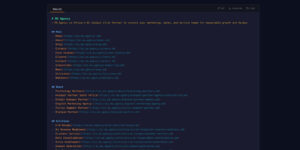
Here’s a simplified example of what this looks like in practice:
# Example Company

> Example Company is a B2B SaaS platform that provides inventory management
> for mid-size ecommerce businesses. We serve over 2,000 customers across
> 14 countries.

## Core Topics
- Real-time inventory tracking
- Multi-warehouse management
- Ecommerce platform integrations
- Demand forecasting

## Key Pages
- [Product Overview](https://example.com/product): Full platform capabilities
- [Integrations](https://example.com/integrations): Supported platforms and APIs
- [Pricing](https://example.com/pricing): Plans and feature comparison
- [Case Studies](https://example.com/case-studies): Customer success stories
Clean, readable, and immediately useful to any AI system that encounters it.
llms.txt vs llms-full.txt
This is where it gets interesting – and where the data tells a story most people don’t expect.
llms.txt is the summary. It’s concise, fits within a small token budget, and gives AI systems enough context to decide whether your site is relevant and which pages to fetch next.
llms-full.txt is the complete version. It can include every page on your site, detailed descriptions, full content sections, and comprehensive metadata. It’s designed for AI systems that want to do a deep crawl of your entire content library.
In theory, llms-full.txt sounds more useful. In practice, the data tells a different story.
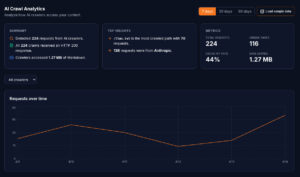
At Getmd, we track every request that AI crawlers make to our customers’ endpoints – including which files they request, how often, and which specific bots are doing the requesting. What we consistently see is that llms.txt gets hit significantly more often than llms-full.txt. The summary file is what AI systems actually use for the vast majority of their retrieval decisions.
Why? Token economics. AI systems have context windows – a finite amount of text they can process in a single request. A concise llms.txt might use 500–1,000 tokens. A comprehensive llms-full.txt for a large website could use 50,000+. When an AI system is answering a user’s question, it needs to be efficient. It reads the summary, identifies the relevant pages, and fetches just those pages in clean markdown. It doesn’t need – or want – to ingest your entire site map every time.
That said, llms-full.txt isn’t useless. Some AI systems do periodic deep crawls for training data or comprehensive indexing. Having both files available means you’re covered for both use cases: real-time retrieval and periodic deep indexing.
The practical takeaway: invest most of your effort in making your llms.txt excellent. Make sure it accurately represents your business, links to your highest-value pages, and stays current. Then create an llms-full.txt as a comprehensive backup.
How llms.txt is different from robots.txt
People often conflate these two files because they both live at the root of your domain and both relate to how bots interact with your website. But they serve completely different purposes.
robots.txt is an access control file. It tells crawlers which parts of your site they’re allowed to visit and which are off-limits. It’s been the standard since the early days of the web.
llms.txt is a discovery file. It tells AI systems what your site contains and where to find the good stuff. It doesn’t restrict access – it guides it.
You need both. robots.txt ensures AI crawlers can access your content in the first place (a surprising number of websites accidentally block AI bots – that’s a topic for another article in this series). llms.txt ensures they know what to do once they arrive.
The freshness problem
Here’s the part most guides skip: llms.txt goes stale.
Your website isn’t static. You publish new blog posts, update service pages, add case studies, change pricing. Every time your content changes, your llms.txt should reflect those changes. If it doesn’t, AI systems are working from an outdated map – and they might miss your most important new content entirely.
For a small, rarely-updated website, manually maintaining llms.txt is manageable. For an active business publishing regularly across dozens or hundreds of pages, it becomes a genuine operational challenge.
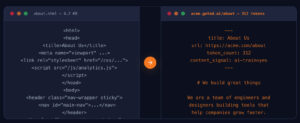
This is one of the core problems Getmd was built to solve. Rather than requiring you to manually update a static text file every time your website changes, Getmd generates and serves your llms.txt dynamically. Your content is converted live, cached on a configurable schedule (as frequently as every five minutes), and served to AI crawlers automatically. When you update a page on your website, the next time an AI crawler requests it through Getmd, it gets the current version – not something you wrote three months ago and forgot to update.
What happens when you don’t have an llms.txt
Nothing catastrophic – your website doesn’t disappear from AI systems entirely. AI crawlers can still find and read your pages through traditional means: following links, reading your sitemap, parsing your HTML directly.
But you’re making it harder for them. Without llms.txt, an AI system encountering your website for the first time has to figure out your content architecture on its own. It has no summary of what you do, no curated list of your most important pages, and no structured guide to your content. It’s the difference between handing someone a well-organised brief and dropping them in your office with no introduction.
In a world where AI systems are making retrieval decisions about thousands of websites in milliseconds, the sites that make themselves easy to understand get an advantage. llms.txt is how you make yourself easy to understand.
How to create your llms.txt
You have three options, ranging from manual to fully automated:
Option 1: Write it by hand. Create a text file, follow the format above, upload it to your web root. Simple, free, and works fine for small sites that don’t change often. The downside is maintenance – you’ll need to remember to update it every time your content changes.
Option 2: Generate it with a script. If you’re technical, you can write a script that pulls your sitemap, generates descriptions, and outputs a formatted llms.txt. Better than manual, but you’ll need to run it periodically and redeploy.
Option 3: Use a platform like Getmd. Getmd handles llms.txt generation, hosting, and freshness automatically as part of making your entire website AI-readable. Your llms.txt is always current because it’s generated from your live site content, served from a dedicated subdomain, and cached on a schedule you control.
Where this fits in the bigger picture
llms.txt is one piece of a larger system for making your website visible to AI. On its own, it helps AI systems discover your content. Combined with clean per-page markdown files, unblocked AI crawlers, and dedicated AI analytics, it becomes part of a complete infrastructure for AI visibility.
The businesses that invest in this infrastructure now – while adoption is still below 15% – will have a significant head start as AI-driven discovery becomes the default way people find products, services, and information.
This is part of our series on making your website visible to AI. Also in this series:
- What is Markdown and Why Every AI System Prefers It
- llms.txt vs llms-full.txt: What the Data Actually Shows
- Why Getmd Converts Live and Caches Every 5 Minutes
- The Clean Markdown Problem: Why Most Converters Produce Garbage
- Which AI Bots Are Visiting Your Website? (And Which Aren’t)
- How to Read Your AI Crawler Analytics and Fix What’s Broken
- Getting Started with Getmd: Connect Your Website in 5 Minutes
- Getmd for WordPress, HubSpot, Shopify, and Webflow
Ready to make your website AI-readable? Start your free trial →