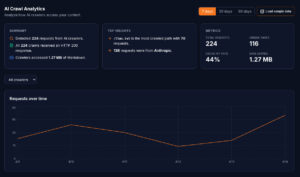
Having AI crawler analytics is one thing. Knowing what to do with them is another.
If you’ve read our guide to which AI bots are visiting your website, you understand the landscape – the 12 crawler families, what each one does, and why their presence (or absence) matters. This article is the next step: how to read the patterns in your data, diagnose problems, and make specific changes that improve your AI visibility.
This is the part that makes Getmd fundamentally different from simply creating an llms.txt file and hoping for the best. You can actually see what’s happening and fix what isn’t working.
The six questions your analytics should answer
Every time you open your Getmd analytics dashboard, you’re looking for answers to six questions:
1. Which bots are visiting?
Start with the crawler breakdown. You should see a list of which AI bot families have visited your site, with request counts for each.
Healthy pattern: Multiple crawler families visiting regularly – at minimum ClaudeBot and PerplexityBot, ideally GPTBot and ChatGPT-User as well.
Warning sign: Only one or two crawlers visiting, or major crawlers completely absent.
Fix: If a specific crawler is missing, the most common cause is a robots.txt block. Check your robots.txt for User-agent: GPTBot (or whichever crawler is absent) followed by Disallow: /. Many CMS plugins and hosting providers add AI crawler blocks by default. Remove the block, and the crawler will start visiting within a few days.
2. Which pages are they hitting?
The path analysis tells you which pages AI crawlers find most interesting about your site.
Healthy pattern: Your most important pages (service pages, product pages, pricing, pillar content) appearing in the most-crawled list. Your llms.txt at or near the top.
Warning sign: AI crawlers focusing on low-value pages (old blog posts, tag pages, category archives) while ignoring your core commercial pages.
Fix: This usually means your llms.txt isn’t pointing to the right pages, or your important pages aren’t linked prominently from your site’s navigation and content. Update your llms.txt to prominently feature your highest-value pages. Check that those pages are internally linked from your homepage and other high-traffic pages.
3. How frequently are they visiting?
The time-series view shows request volume over days and weeks.
Healthy pattern: Steady or gradually increasing request volume. Regular patterns (not just one-off spikes).
Warning sign: Declining request volume over time. Or a sudden drop to zero.
Fix: Declining traffic usually means something changed. The most common causes: a robots.txt change blocked AI crawlers, your markdown endpoint started returning errors, a CMS update broke the page structure, or your SSL certificate expired on the AI-readable subdomain. Check each of these in order. A sudden drop to zero almost always indicates a technical failure rather than a content problem.
4. What response codes are they getting?
This is the most actionable metric in your analytics. Response codes tell you immediately whether your content is being served successfully.
200 – Success. The crawler requested the page and got clean markdown back. This is what you want.
301/302 – Redirect. The crawler requested a URL and was redirected somewhere else. Occasional redirects are fine (old URLs pointing to new ones). Many redirects suggest your URL structure has changed without updating your llms.txt or internal links.
403 – Forbidden. The crawler was blocked. This could be a robots.txt issue, a firewall rule, a CDN security setting, or a server configuration that blocks specific user agents. This needs immediate attention – a 403 means the AI system can’t read that page at all.
404 – Not Found. The URL the crawler requested doesn’t exist. This might mean a page was deleted or moved without updating the references. Check your llms.txt for links to pages that no longer exist.
500 – Server Error. Something went wrong on the server side when processing the request. This might be intermittent (a timeout, a memory issue) or consistent (a broken conversion for that specific page). If you see 500s on the same path repeatedly, that page has a conversion problem.
What to prioritise: Fix 403s first (access is completely blocked), then 404s (broken links), then 500s (server failures). 301/302s are lower priority unless there are many of them.
5. Are specific bots getting different results?
Sometimes the same page returns different response codes to different crawlers. This usually means a security rule or firewall is blocking specific user agents.
Common scenario: ClaudeBot gets 200s on all pages, but GPTBot gets 403s on every request. This means your server or CDN has a rule specifically blocking OpenAI’s crawler – possibly added by a CMS plugin or hosting provider without your knowledge.
Fix: Check your web application firewall (WAF), CDN security settings, and any CMS plugins that manage bot traffic. Look for rules that target specific AI crawler user agents.
6. What’s the data volume trend?
Beyond request counts, the total data served to AI crawlers tells you how much content they’re actually consuming.
Healthy pattern: Data volume roughly proportional to request volume. More requests → more data served.
Warning sign: High request counts but low data volume. This means crawlers are requesting pages but getting very little content back – possibly empty pages, error pages, or pages where the content extraction is failing.
Fix: Check the actual markdown output for the pages being requested. If the content is unexpectedly short or empty, there may be a conversion issue. The page might rely heavily on JavaScript to render content (which markdown converters can’t execute), or the content might be behind a login or paywall.
The reverse-engineering workflow
Here’s the practical workflow for using your analytics to improve AI visibility. Do this weekly until you’re seeing consistent healthy patterns, then monthly for maintenance.
Step 1: Check for new problems.
Open your analytics and look for red flags – declining request volume, new 403s or 404s, a crawler that was visiting but has stopped. If everything looks stable, move to Step 2. If something’s changed, diagnose and fix it before moving on.
Step 2: Verify your top pages.
Look at which pages are getting the most AI crawler attention. Are they the pages you want AI systems to read? If your blog archive page is getting more traffic than your solutions page, that’s a signal to update your llms.txt and internal linking.
Step 3: Test in actual AI systems.
This is the step most people skip. Take your most-crawled pages and ask the relevant AI systems questions that those pages should answer.
If ClaudeBot has been hitting your CRM implementation page regularly, go to Claude and ask: “Which companies offer CRM implementation services in [your market]?” If your content is good and your markdown is clean, you should appear. If you don’t, the content structure might need work even though the crawler is consuming it.
If PerplexityBot visits your pricing page, search Perplexity for “[your product] pricing.” You should appear in the results.
Step 4: Identify gaps.
Compare the list of pages you want AI systems to cite with the list of pages AI systems are actually visiting. Any page that’s important to your business but absent from your crawler analytics is a gap.
Common reasons for gaps: the page isn’t in your llms.txt, the page doesn’t have clean markdown available, the page returns an error to AI crawlers, or the page’s content doesn’t match what AI systems are looking for.
Step 5: Make changes and monitor.
Fix the issues you’ve identified and watch the analytics over the next week. You should see new pages appearing in crawler activity, error rates declining, and request volume stabilising or growing.
Real patterns and what they mean
Here are some specific patterns we see across Getmd customers and what they indicate:
Pattern: ClaudeBot visits daily, GPTBot visits weekly, PerplexityBot visits multiple times per day.
Interpretation: Normal. Each AI company has different crawl schedules. Perplexity is the most aggressive because its product depends entirely on real-time retrieval. Claude is regular but less frequent. OpenAI’s GPTBot crawls for training data on a slower schedule.
Pattern: ChatGPT-User appears in bursts, always on the same 2–3 pages.
Interpretation: People are asking ChatGPT questions that your site answers, and it keeps fetching the same pages. This is excellent – it means those pages are being cited in real conversations. Consider expanding the content on those pages and creating related content to broaden your coverage.
Pattern: All crawlers hit llms.txt frequently, but very few page requests follow.
Interpretation: AI systems are reading your discovery file but not finding pages worth fetching. Your llms.txt might not be linking to the right content, or the page descriptions might not match what the AI system is looking for. Revise your llms.txt to include clearer descriptions and links to your strongest content.
Pattern: High request volume but almost all requests return 301 redirects.
Interpretation: Your URLs have changed (perhaps from a site redesign or CMS migration) but your llms.txt and markdown endpoints still reference the old URLs. Update your llms.txt to use current URLs, and ensure your markdown conversion follows redirects to serve the final content.
Pattern: Request volume drops suddenly to near zero.
Interpretation: Something broke. In order of likelihood: a robots.txt change blocked AI crawlers, your markdown endpoint is returning errors, a DNS or SSL issue is preventing access, or a firewall rule is blocking bot traffic. Check each in order.
Closing the loop
The real power of AI crawler analytics isn’t just monitoring – it’s the feedback loop. You make your content available, you watch how AI systems respond, you identify gaps, you fix them, and you watch the results.
This is the workflow that turns AI readability from a one-time setup task into an ongoing practice with measurable outcomes. The businesses that run this workflow consistently are the ones that show up when AI systems answer questions about their industry.
Start seeing what AI systems see. Start your free trial →
This is part of our series on making your website visible to AI. Also in this series:
- Introducing Getmd: Make Your Website Visible to AI
- What is Markdown and Why Every AI System Prefers It
- What is llms.txt? The Discovery File AI Crawlers Actually Read
- llms.txt vs llms-full.txt: What the Data Actually Shows
- Why Getmd Converts Live and Caches Every 5 Minutes
- The Clean Markdown Problem: Why Most Converters Produce Garbage
- Which AI Bots Are Visiting Your Website? (And Which Aren’t)
- Getting Started with Getmd: Connect Your Website in 5 Minutes
- Getmd for WordPress, HubSpot, Shopify, and Webflow