If you’ve ever tried converting a web page to markdown, you’ve probably been disappointed by the result. You paste a URL into a converter, hit “convert,” and get back something that technically is markdown – but still full of navigation links, footer text, cookie consent copy, sidebar widgets, “Skip to main content” labels, and fragments of JavaScript that the converter didn’t know what to do with.
The format is right. The content is wrong.
This is the clean markdown problem, and it’s one of the hardest technical challenges in making websites readable by AI systems. Getting the conversion right – stripping the noise while preserving the content – is the difference between serving AI crawlers something useful and serving them a slightly different flavour of the same mess they’d get from raw HTML.
What “clean” actually means
Let’s be precise about what clean markdown looks like, because the bar is higher than most people assume.
Clean markdown from a web page should contain:
The page’s actual content. The headings, paragraphs, lists, tables, images, and links that a human visitor came to the page to read. Nothing more.
A correct heading hierarchy. H1 for the page title, H2 for major sections, H3 for subsections. Consistent, predictable, and reflecting the actual content structure – not the visual layout.
Properly formatted elements. Bullet points that are actually lists. Numbered steps that are actually ordered lists. Tables that preserve their row and column structure. Code blocks that maintain their formatting. Links that point to the right destinations.
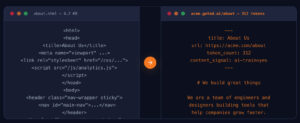
Useful metadata. The page title, a description, the canonical URL, and the last-modified date – ideally as YAML frontmatter at the top of the file.
Nothing else. No navigation menus. No footer links. No sidebar widgets. No cookie consent text. No “Subscribe to our newsletter” popups. No social media share buttons. No “Back to top” links. No breadcrumbs. No related posts. No author bios (unless they’re part of the content). No advertisements. No tracking pixel remnants. No chat widget labels.
That “nothing else” is where every simple converter falls apart.
Why simple converters fail
An HTML-to-markdown converter typically works by mapping HTML tags to their markdown equivalents. <h2> becomes ##. <p> becomes a paragraph. <a href=""> becomes [text](url). <ul><li> becomes - item.
This tag-to-syntax conversion is straightforward and every library handles it correctly. The problem isn’t the conversion – it’s the selection. Which parts of the HTML should be converted?
A web page’s HTML includes everything the browser needs to render the visual layout: navigation components, layout containers, sidebar modules, footer sections, embedded scripts, tracking snippets, and the actual page content. A simple converter doesn’t distinguish between “this <div> contains navigation links” and “this <div> contains the blog post.” It converts all of them.
The result is markdown that starts with your navigation menu:
[Home](/) [About](/about) [Services](/services) [Blog](/blog) [Contact](/contact)

[Skip to content](#main)

# Your Actual Page Title

Your actual content starts here...
And ends with your footer:
...your actual content ends here.

## Quick Links

- [Privacy Policy](/privacy)
- [Terms of Service](/terms)
- [Sitemap](/sitemap)

© 2026 Your Company. All rights reserved.

[Facebook](https://facebook.com/you) [Twitter](https://twitter.com/you) [LinkedIn](https://linkedin.com/company/you)
For an AI system processing this markdown, the navigation and footer are pure noise. They appear on every page, they don’t contain the information the AI system is looking for, and they consume tokens that could be used for actual content.
The CMS-specific challenge
Making this harder: every CMS structures its HTML differently.
WordPress wraps page content in a <div class="entry-content"> or similar, with navigation in a <header> or <nav> element. But themes vary enormously – some nest content four or five <div> levels deep, some use <article> tags, some use custom class names, and page builders like Elementor and Divi generate deeply nested, class-heavy markup that looks nothing like standard WordPress output.
HubSpot Content Hub uses a module-based system where the page is composed of drag-and-drop modules. Each module generates its own HTML structure. The “content” isn’t in a single container – it’s distributed across multiple modules, interspersed with layout modules, CTA modules, and form modules that aren’t content.
Shopify templates use Liquid markup that generates product-specific HTML. Product pages include structured data for variants, inventory, reviews, and related products – much of which is useful for AI systems but needs to be extracted differently from blog content.
Webflow generates clean semantic HTML but wraps everything in Webflow-specific class names and includes its own JavaScript bundle. The content identification is relatively straightforward, but the class-name noise needs to be stripped without losing the content structure.
Custom builds are the wildest card. Every custom website has its own HTML structure, its own class naming conventions, and its own approach to separating content from layout.
A markdown converter that works perfectly on WordPress will produce garbage on HubSpot. One tuned for Shopify will miss content on Webflow. This is why “just use an HTML-to-markdown library” isn’t a real solution for AI readability at scale.
How Getmd handles this
Getmd’s conversion pipeline is built to handle the CMS-specific challenge. Rather than applying a single conversion rule to every website, the system identifies the content structure of each site and extracts accordingly.
The key principles:
Content extraction, not tag conversion. The first step isn’t converting HTML to markdown – it’s identifying which parts of the HTML are content. Navigation, headers, footers, sidebars, and boilerplate are identified and excluded before the conversion step even begins.
CMS-aware processing. Getmd recognises common CMS patterns and applies CMS-specific extraction rules. A HubSpot page is processed differently from a WordPress page because the HTML structures are fundamentally different. This isn’t a generic scraper – it’s purpose-built for the specific CMSs that businesses actually use.
Post-processing cleanup. After the initial conversion, the output goes through a cleanup pass that catches the edge cases: orphaned link fragments, empty headings, duplicate whitespace, broken list formatting, and remnants of dynamic content (JavaScript state, data attributes, ARIA labels that aren’t useful in a text context).
Metadata generation. The final output includes YAML frontmatter with the page title, description, canonical URL, and last-modified date – structured metadata that AI systems use for source evaluation.
The result is markdown that contains what a human would consider “the content of this page” – and nothing else.
What bad markdown costs you
Why does this matter? Because the quality of your markdown directly affects whether AI systems cite your content.
Token waste. Navigation and footer text in your markdown wastes tokens. On a typical page, bad conversion can add 2,000–4,000 tokens of noise. That’s tokens the AI system spends processing irrelevant content instead of your actual information.
Extraction confusion. When an AI system encounters markdown that starts with navigation links, it has to figure out where the navigation ends and the content begins. This introduces extraction errors – the system might misidentify a navigation link as a content reference, or lose track of the content structure entirely.
Repeated boilerplate. If an AI system fetches five pages from your site and each one starts with the same 30-line navigation block, it’s processing the same irrelevant content five times. Clean markdown means each page delivers unique value from the first line.
Credibility signal. AI systems evaluate source quality. A page that serves clean, well-structured markdown signals a site that takes content delivery seriously. A page that serves markdown full of navigation remnants and broken formatting signals the opposite.
How to evaluate your current output
If you’re already serving markdown (through Getmd or any other method), here’s a quick quality check:
- Fetch your own page. Visit your markdown endpoint and read the output.
- Check the first 10 lines. Do they contain your page title and the start of your content? Or do they contain navigation links and breadcrumbs?
- Check the last 10 lines. Do they contain the end of your content? Or footer links, copyright notices, and social media icons?
- Look for orphans. Are there lines that don’t make sense in context – fragments of buttons, form labels, widget text, “Loading…” messages?
- Check the heading hierarchy. Is there a single H1? Do H2s and H3s follow a logical structure? Or are there heading jumps (H1 → H4) or duplicate H1s?
- Count the noise. What percentage of the markdown is actual content versus boilerplate?
If your markdown passes all six checks, you’re in good shape. If it doesn’t, the quality of what AI systems see when they visit your site is lower than you think.
The bottom line
Converting HTML to markdown is easy. Converting HTML to clean markdown – stripping the layout, preserving the content, handling CMS-specific structures, and producing output that’s genuinely useful for AI systems – is a hard engineering problem.
It’s also one of the most important problems in AI readability, because the quality of your markdown is the quality of what AI systems know about you. If your markdown is full of noise, AI systems see noise. If your markdown is clean, AI systems see your content – clearly, efficiently, and in the format they prefer.
See what your website looks like to AI systems. Start your free trial →
This is part of our series on making your website visible to AI. Also in this series:
- Introducing Getmd: Make Your Website Visible to AI
- What is Markdown and Why Every AI System Prefers It
- What is llms.txt? The Discovery File AI Crawlers Actually Read
- llms.txt vs llms-full.txt: What the Data Actually Shows
- Why Getmd Converts Live and Caches Every 5 Minutes
- Which AI Bots Are Visiting Your Website? (And Which Aren’t)
- How to Read Your AI Crawler Analytics and Fix What’s Broken
- Getting Started with Getmd: Connect Your Website in 5 Minutes
- Getmd for WordPress, HubSpot, Shopify, and Webflow