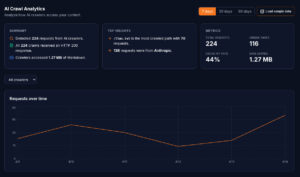
Here’s something most website owners don’t realise: AI systems are already visiting your website. ClaudeBot, GPTBot, PerplexityBot, and others are requesting your pages, evaluating your content, and making decisions about whether to include you in their answers. The problem is that you can’t see any of this in your existing analytics.
Google Analytics filters out bot traffic. HubSpot analytics shows human visitors. Matomo, Plausible, Fathom – every standard web analytics platform was designed to track people in browsers, not AI crawlers making server-side requests. You have a blind spot covering what might be the most important audience your website has in 2026.
The 12 AI crawler families
There are twelve major AI crawler families currently active on the web. Each one belongs to a different AI company, serves a different purpose, and behaves differently when it visits your site.
ClaudeBot – Operated by Anthropic. Powers Claude’s web browsing and retrieval capabilities. One of the most active AI crawlers we see across Getmd customer sites. Visits regularly, respects robots.txt, and requests markdown endpoints when they’re available.
GPTBot – Operated by OpenAI. Used for training data collection and knowledge base updates. This is the crawler that feeds OpenAI’s models with web content. Visits broadly but less frequently than ClaudeBot for real-time retrieval.
ChatGPT-User – Also operated by OpenAI, but distinct from GPTBot. This is the crawler that activates when a ChatGPT user asks a question that triggers web browsing. It fetches pages in real time to answer specific questions. If someone asks ChatGPT about your industry and your site appears, this is the bot that visits.
PerplexityBot – Operated by Perplexity AI. Perplexity is an AI-powered search engine that cites its sources. PerplexityBot is particularly active because Perplexity’s entire product depends on real-time web retrieval. It fetches pages frequently and across a wide range of topics.
Googlebot (AI Overviews) – Google’s existing crawler also feeds AI Overviews – the AI-generated summaries that appear at the top of search results. While the same Googlebot user agent crawls for both traditional search and AI purposes, the pages it prioritises for AI Overviews may differ from its traditional indexing behaviour.
Bingbot / Microsoft – Powers Copilot and Bing Chat. Microsoft’s AI features rely on Bing’s index, and Bingbot is the crawler that builds it.
AppleBot – Apple’s crawler, increasingly relevant as Apple integrates AI features across its ecosystem. Apple Intelligence and Siri’s evolving capabilities rely on web content.
Meta-ExternalAgent – Meta’s crawler for AI training and retrieval. As Meta builds AI features into WhatsApp, Instagram, and its standalone AI products, this crawler is becoming more active.
Amazonbot – Amazon’s crawler for Alexa and Amazon’s AI services.
Bytespider – ByteDance’s crawler, used for TikTok’s AI features and broader AI development.
cohere-ai – Cohere’s crawler, used for enterprise AI applications and retrieval-augmented generation.
Diffbot – A web scraping and knowledge graph service used by many AI companies. Diffbot doesn’t power a consumer AI product directly but feeds data to systems that do.
What each bot’s presence (or absence) tells you
Knowing which bots visit is more useful than knowing that bots visit. Each crawler’s behaviour gives you specific, actionable intelligence:
ClaudeBot visiting regularly → your content is in Claude’s retrieval pool. This means when someone asks Claude a question about your industry, your content is a candidate for citation. You can verify this by asking Claude directly.
GPTBot visiting but ChatGPT-User absent → you’re in training data but not live retrieval. Your content may inform ChatGPT’s base knowledge, but when users trigger web browsing, your site isn’t being fetched. This might mean your content isn’t ranking highly enough in ChatGPT’s retrieval system, or your live pages aren’t accessible enough for real-time fetching.
PerplexityBot active → you’re appearing in Perplexity answers. Since Perplexity cites its sources with links, you can verify this directly by searching Perplexity for questions your content answers. If PerplexityBot is visiting your service pages, someone is asking Perplexity about your services.
ChatGPT-User visiting specific pages → those pages are being cited in real conversations. ChatGPT-User only activates when a user’s question triggers web browsing. If it’s hitting your pricing page, someone asked ChatGPT about your pricing. If it’s hitting your comparison page, someone asked for a comparison in your space.
A bot you expect is missing → something is blocking it. If ClaudeBot visits regularly but GPTBot never appears, check your robots.txt. Many websites accidentally block specific AI crawlers without realising it. A Disallow: / rule for GPTBot means OpenAI’s systems can’t see your content at all.
What we see across Getmd customers
Without sharing any individual customer data, here are the patterns we observe across our customer base:
ClaudeBot and PerplexityBot are the most consistently active crawlers. They visit regularly and request the widest range of pages. For most sites, these two account for the majority of AI crawler traffic.
ChatGPT-User traffic is bursty. It correlates with real user activity – someone asks ChatGPT a question, the bot fetches the page, then nothing until the next question. You see spikes rather than steady traffic.
llms.txt is the most-requested file. Across nearly all sites, the llms.txt file receives more requests than any individual content page. AI systems check the discovery file frequently – much more than llms-full.txt.
Service pages and pillar content get more AI crawler attention than blog posts. This makes sense – AI systems answer questions, and service pages tend to answer the kinds of commercial and informational queries people ask AI assistants.
404s and 403s are more common than people expect. Many sites have broken URLs, redirect chains, or access rules that block AI crawlers on specific paths. Without analytics, these silent failures are invisible.
Why your current analytics can’t show this
It’s worth understanding why Google Analytics and similar tools don’t help here, because the limitation is fundamental, not just a feature gap.
Bot filtering is a feature, not a bug. Web analytics platforms filter out bot traffic on purpose. Their job is to show you human visitor behaviour – page views, bounce rates, conversion paths. Bot traffic would distort all of these metrics. So they identify and exclude known bot user agents from your reports.
Server-side requests don’t trigger JavaScript analytics. Google Analytics, HubSpot analytics, and most modern analytics tools work by executing a JavaScript snippet when a page loads in a browser. AI crawlers don’t execute JavaScript. They make HTTP requests and read the response. Your analytics JavaScript never runs, so the visit is never recorded – even before bot filtering.
Server logs could work, but don’t in practice. Your server access logs do record AI crawler visits. In theory, you could parse them, filter for AI bot user agents, and build your own analytics. In practice, this requires technical access to raw logs (which CDN-proxied sites often don’t have easy access to), custom scripting, and ongoing maintenance. And the result is a flat text file, not a dashboard you can actually use.
This is the gap Getmd fills. Purpose-built analytics for AI crawler activity, with per-bot filtering, time-series charts, path analysis, response code monitoring, and trend tracking – all the things you need to understand whether AI systems are actually reading your website.
Getting started with AI crawler analytics
If you want to see which AI bots are visiting your website:
Step 1: Connect your site to Getmd. The analytics dashboard starts tracking from the moment your site is live.
Step 2: Wait 48–72 hours for initial data to accumulate. AI crawlers visit on their own schedules, and you need a few days of data to see patterns.
Step 3: Check your crawler breakdown. Which bots are visiting? Which aren’t? Are there any you expected to see that are missing?
Step 4: Check your path analysis. Which pages are getting the most AI crawler attention? Are your most important pages being read, or are bots spending time on pages you don’t care about?
Step 5: Read our guide on how to interpret your analytics and fix what’s broken. The data is only useful if you know what to do with it.
The businesses that understand their AI crawler traffic today will be the ones best positioned as AI-driven discovery becomes the primary way people find products, services, and information.
See which AI bots are reading your website – and which aren’t. Start your free trial →
This is part of our series on making your website visible to AI. Also in this series:
- Introducing Getmd: Make Your Website Visible to AI
- What is Markdown and Why Every AI System Prefers It
- What is llms.txt? The Discovery File AI Crawlers Actually Read
- llms.txt vs llms-full.txt: What the Data Actually Shows
- Why Getmd Converts Live and Caches Every 5 Minutes
- The Clean Markdown Problem: Why Most Converters Produce Garbage
- How to Read Your AI Crawler Analytics and Fix What’s Broken
- Getting Started with Getmd: Connect Your Website in 5 Minutes
- Getmd for WordPress, HubSpot, Shopify, and Webflow